Public Function SetExist(ByVal vDraw As Variant, ByVal sSet As String) As Boolean Dim I As Integer, J As Integer SetExist = False If vDraw Is Nothing Then Exit Function For I = 0 To vDraw.SelectionSets.Count – 1 If vDraw.SelectionSets.Item(I).Name = sSet Then SetExist = True Next I End Function
Public Function DictionaryExist(ByVal vDraw As Variant, ByVal sDict As String) As Boolean Dim I As Integer, J As Integer On Error GoTo ERR_NO_KEY DictionaryExist = False If vDraw Is Nothing Then Exit Function Set oDictionary = vDraw.Dictionaries.Item(sDict) ‘试错 DictionaryExist = True On Error GoTo 0 Exit Function ERR_NO_KEY: ‘primary key DictionaryExist = False On Error GoTo 0 End Function
Public Function AppExist(ByVal vDraw As Variant, ByVal sApp As String, ByVal sDict As String) As Boolean Dim I As Integer, J As Integer AppExist = False If vDraw Is Nothing Then Exit Function If Not DictionaryExist(oDraw, sDict) Then Exit Function Set oDictionary = vDraw.Dictionaries.Item(sDict) Dim XTypeOut As Variant Dim XValueOut As Variant oDictionary.GetXData “”, XTypeOut, XValueOut If Not IsArray(XTypeOut) Then Exit Function If Not IsArray(XValueOut) Then Exit Function For I = LBound(XTypeOut) To UBound(XTypeOut) If XTypeOut(I) = 1001 And XValueOut(I) = sApp Then AppExist = True End If Next I End Function
‘绑定 AutoCAD Dim I As Integer, J As Integer Dim oAutoCAD As Object ‘AutoCAD Application 本身 Call BindAutoCAD(True) Dim oDraw As Object ‘AutoCAD 多文档之一
‘打开并绑定文件 D:/Test.dwg Set oDraw = oAutoCAD.Application.Documents.Open(“D:/Test.dwg”)
‘绑定 Microsoft Excel Dim oExcel As Object ‘Microsoft Excel Application 本身 Call BindExcel(True) Dim oBook As Object ‘Microsoft Excel 多工作薄之一 Dim oSheet As Object ‘工作薄的工作表之一
‘打开并绑定文件 D:/Test.xls Set oBook = oExcel.Application.WorkBooks.Open(“D:/Test.xls”)
‘绑定已有工作表 Sheet1 Set oSheet = oBook.Sheets(“Sheet1”)
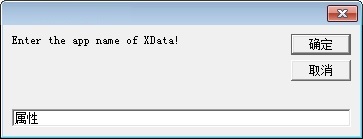
‘输入 App 名称 Dim sApp As String sApp = InputBox(“Enter the app name of XData!”, “”, sApp, Me.Left + 1800, Me.Top + 2400) ‘sApp 为空表示所有 App
‘屏幕选择图元 Dim PointPicked As Variant Dim oEntity As Object oDraw.Activate oDraw.Utility.GetEntity oEntity, PointPicked
‘读取扩展数据 Dim iType As Variant Dim sValue As Variant iType = DetachXData(oEntity, sApp, “Type”) sValue = DetachXData(oEntity, sApp, “Value”)
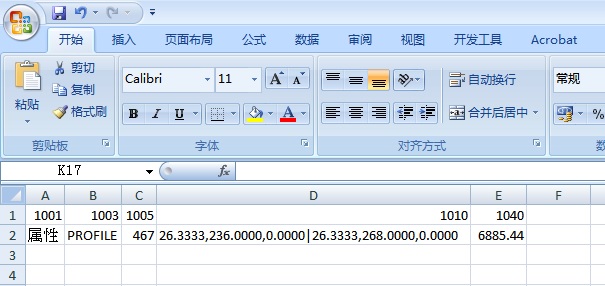
‘展示扩展数据 Dim I As Integer, J As Integer For I = LBound(iType) To UBound(iType) oSheet.Cells(1, GetColumnNumber(oSheet, iType(I), 1)) = iType(I) oSheet.Cells(TargetRow, GetColumnNumber(oSheet, iType(I), 1)) = sValue(I) Next I For J = MinColumn(oSheet) To MaxColumn(oSheet) oSheet.Columns(J).AutoFit ‘调整列宽 Next J
Public Function DetachXData(ByVal oEntity As Object, Optional ByVal sApp As String = “”, Optional ByVal sScope As String = “”) As Variant Dim I As Integer, J As Integer ‘ Return the xdata for the entity Dim XTypeOut As Variant Dim XValueOut As Variant oEntity.GetXData sApp, XTypeOut, XValueOut If Not IsArray(XTypeOut) Then Exit Function If Not IsArray(XValueOut) Then Exit Function Dim iArray() As Integer Dim sArray() As String Dim vTemp As Variant Dim iCount As Integer For I = LBound(XTypeOut) To UBound(XTypeOut) If Not IsInArray(XTypeOut(I), iArray) Then iCount = iCount + 1 ReDim Preserve iArray(0 To iCount – 1) ReDim Preserve sArray(0 To iCount – 1) iArray(iCount – 1) = XTypeOut(I) End If Next I ‘IsMissing 只对 Variant 变量有效 If IsMissing(sScope) Or sScope = “” Or InStr(1, sScope, “Type”, vbTextCompare) > 0 Then ‘DataType DetachXData = iArray Else ‘DataValue For I = LBound(iArray) To UBound(iArray) For J = LBound(XTypeOut) To UBound(XTypeOut) If XTypeOut(J) = iArray(I) Then If iArray(I) = 1010 Or iArray(I) = 1011 Or iArray(I) = 1012 Or iArray(I) = 1013 Then ‘三维 vTemp = XValueOut(J) sArray(I) = sArray(I) & “|” & vTemp(0) & “,” & vTemp(1) & “,” & vTemp(2) Else sArray(I) = sArray(I) & “|” & XValueOut(J) End If sArray(I) = CutTerminal(sArray(I), “|”) Else ‘Nothing End If Next J Next I DetachXData = sArray End If End Function
‘绑定 AutoCAD Dim I As Integer, J As Integer Dim oAutoCAD As Object ‘AutoCAD Application 本身 Call BindAutoCAD(True) Dim oDraw As Object ‘AutoCAD 多文档之一
‘打开并绑定文件 D:/Test.dwg Set oDraw = oAutoCAD.Application.Documents.Open(“D:/Test.dwg”)
‘绑定 Microsoft Excel Dim oExcel As Object ‘Microsoft Excel Application 本身 Call BindExcel(True) Dim oBook As Object ‘Microsoft Excel 多工作薄之一 Dim oSheet As Object ‘工作薄的工作表之一
‘打开并绑定文件 D:/Test.xls Set oBook = oExcel.Application.WorkBooks.Open(“D:/Test.xls”)
‘绑定已有工作表 Sheet1 Set oSheet = oBook.Sheets(“Sheet1”)
‘屏幕选择图元 Dim PointPicked As Variant Dim oEntity As Object oDraw.Activate oDraw.Utility.GetEntity oEntity, PointPicked
‘指向 TargetRow 行第一列 Dim TargetRow As Integer TargetRow = MaxRow(oSheet) ‘有文字的最大行 oSheet.Cells(TargetRow, 1).Select
‘添加扩展数据 For J = MinColumn(oSheet) To MaxColumn(oSheet) If IsInteger(oSheet.Cells(1, J)) And _ IsInRange(oSheet.Cells(1, J), 1000, 1071, True) And _ Not oSheet.Cells(TargetRow, J) = “” Then ‘允许等于上下界 Dim iCount As Integer iCount = iCount + 1 ReDim Preserve iTypeArray(0 To iCount – 1) ReDim Preserve sValueArray(0 To iCount – 1) iTypeArray(iCount – 1) = oSheet.Cells(1, J) sValueArray(iCount – 1) = oSheet.Cells(TargetRow, J) ‘新数据行位于最后 End If Next J ‘Debug.Print IsEmptyArray(iTypeArray) ‘Debug.Print IsEmptyArray(sValueArray) If AttachXData(oEntity, iTypeArray(), sValueArray()) Then Debug.Print “Attached.” Else Debug.Print “Not attached.” End If
Public Function AttachXData(ByVal oEntity As Object, ByRef iType() As Integer, ByRef sValue() As String) As Boolean Dim I As Integer, J As Integer AttachXData = False If Not IsObject(oEntity) Then Exit Function If Not IsArray(iType) Then Exit Function If Not IsArray(sValue) Then Exit Function If Not LBound(iType) = LBound(sValue) Then Exit Function If Not UBound(iType) = UBound(sValue) Then Exit Function If Not IsInArray(“1001”, iType) Then Exit Function If Not iType(LBound(iType)) = “1001” Then Exit Function For J = LBound(iType) To UBound(iType) If Not IsInteger(iType(J)) Then Exit Function If Trim(sValue(J)) = “” Then Exit Function Select Case iType(J) Case 1001 ‘排第一 If CountStr(False, sValue(J), “|”) > 0 Then Exit Function ‘Only one appname is allowed when attaching. Case 1000, 1002, 1003, 1004, 1005 ‘1002/1004 数据特殊 ‘Nothing Case 1010, 1011, 1012, 1013 ‘三维 For I = 1 To CountStr(False, sValue(J), “|”) + 1 If Not CountStr(False, ExtractDivide(“|”, sValue(J), I), “,”) = 2 Then Exit Function ‘The data format is as nnn,nnn,nnn. If Not IsNumeric(ExtractDivide(“,”, ExtractDivide(“|”, sValue(J), I), 1)) Then Exit Function If Not IsNumeric(ExtractDivide(“,”, ExtractDivide(“|”, sValue(J), I), 2)) Then Exit Function If Not IsNumeric(ExtractDivide(“,”, ExtractDivide(“|”, sValue(J), I), 3)) Then Exit Function Next I Case 1040, 1041, 1042 For I = 1 To CountStr(False, sValue(J), “|”) + 1 If Not IsNumeric(ExtractDivide(“|”, sValue(J), I)) Then Exit Function Next I Case 1070, 1071 For I = 1 To CountStr(False, sValue(J), “|”) + 1 If Not IsInteger(ExtractDivide(“|”, sValue(J), I)) Then Exit Function Next I Case Else ‘Nothing End Select Next J ‘DXF 组码值 扩展数据内容 ‘1000 字符串, 扩展数据中的字符串可长达 255 字节(第 256 字节是为空字符保留的) ‘1001 应用程序名, 应用名称可长达 31 字节(第 32 字节是为空字符保留的),而且必须符合符号表的名称规则(如图层名称)。应用名称可包含字母、数字、专用字符 $(美元符号)、-(连字符)以及 _(下划线),但不能包含空格 ‘1002 控制字符串, 扩展数据的控制字符串可以是”{“或”}”。这些大括号使应用可以通过将扩展数据细分为表来组织它们。左括号开始一个表,右括号结束最新的表。表是可以嵌套的 ‘1003 图层名, 与扩展数据相关联的图层名称, 须是已有层 ‘1004 二进制数据, 二进制数据被组织为可变长度的数据块,它可在有 ads_binary 结构的 ObjectARX 中处理。数据块的最大长度为 127 字节 ‘1005 数据库对象句柄, 图形数据库中的图元句柄 ‘1010 三维点(X, Y, Z), 一个点中的三个实数值 ‘1011 三维空间位置, 与简单的三维点不同,其 WCS 坐标随扩展数据所属的父图元移动、比例缩放、旋转和镜像。当对父图元使用 STRETCH 命令并且此点位于选择窗口中时,该 WCS 的位置也会被拉伸 ‘1012 三维空间距离, 一个随着父图元比例缩放、旋转或镜像的三维点,但不可拉伸或移动 ‘1013 三维空间方向, 一个随着父图元旋转或镜像的三维点,但不可比例缩放、拉伸或移动。其 WCS 方向是一个单位长度的规格化向量 ‘1040 浮点数, 一个实数值 ‘1041 距离值, 一个随着父图元比例缩放的实数值 ‘1042 比例系数, 一个随着父图元比例缩放的实数值 ‘1070 整数, 一个 16 位整数(带符号或不带符号) ‘1071 长整数, 一个 32 位带符号的(长)整数。如果 1071 组码中出现短整数或实数值,则被转换为一个长整数;如果组码值非法(例如一个字符串),则将被转换为长整数形式的零 (0L) Dim iCount As Integer For J = LBound(iType) To UBound(iType) iCount = iCount + 1 iCount = iCount + CountStr(False, sValue(J), “|”) Next J If iCount = 0 Then Exit Function ‘ Initialize all the xdata values. Note that first data in the list should be application name and first datatype code should be 1001 ReDim DataType(0 To iCount – 1) As Integer ReDim DataValue(0 To iCount – 1) As Variant iCount = 0 ‘重置 Dim ThreeDim(0 To 2) As Double For J = LBound(iType) To UBound(iType) For I = 1 To CountStr(False, sValue(J), “|”) + 1 iCount = iCount + 1 DataType(iCount – 1) = iType(J) ‘Debug.Print DataType(iCount – 1) If iType(J) = 1010 Or iType(J) = 1011 Or iType(J) = 1012 Or iType(J) = 1013 Then ‘三维 ThreeDim(0) = ExtractDivide(“,”, ExtractDivide(“|”, sValue(J), I), 1) ThreeDim(1) = ExtractDivide(“,”, ExtractDivide(“|”, sValue(J), I), 2) ThreeDim(2) = ExtractDivide(“,”, ExtractDivide(“|”, sValue(J), I), 3) ‘Debug.Print ThreeDim(0) ‘Debug.Print ThreeDim(1) ‘Debug.Print ThreeDim(2) DataValue(iCount – 1) = ThreeDim Else DataValue(iCount – 1) = ExtractDivide(“|”, sValue(J), I) ‘Debug.Print DataValue(iCount – 1) End If Next I Next J ‘ Attach the xdata to the entity oEntity.SetXData DataType, DataValue AttachXData = True End Function
‘将任意整数分解为等比数列之中的数值 Dim vRet As Variant vRet = GeometricSeriesEx(2147483647) For I = LBound(vRet) To UBound(vRet) Debug.Print vRet(I) Next I
Public Function GeometricSeriesEx(ByVal lData As Long) As Variant ‘分解整数为 1 2 4 8 16 32 64 … …,且每个数只出现一次 Dim I As Integer, J As Integer If Not IsNumericEx(lData) Then Exit Function Dim sBin As String sBin = DEC_to_BIN(lData) Dim iCount As Integer Dim TempArray() As Long For I = 1 To Len(sBin) If Mid(sBin, I, 1) = “1” Then ReDim Preserve TempArray(0 To iCount) TempArray(iCount) = 2 ^ (Len(sBin) – I) iCount = iCount + 1 End If Next I GeometricSeriesEx = TempArray End Function
Public Function DEC_to_BIN(Dec As Long) As String ‘十进制转化为二进制 DEC_to_BIN = “” Do While Dec > 0 DEC_to_BIN = Dec Mod 2 & DEC_to_BIN Dec = Dec \ 2 Loop End Function
Public Function IsNumericEx(ByVal sData As String) As Boolean ‘电子表格空格被 IsNumeric 视为数值 0,IsNumericEx 则视为字符 “” IsNumericEx = False sData = Trim(sData) If sData = “” Then Exit Function IsNumericEx = IsNumeric(sData) End Function
Public Function IsInteger(ByVal txtString As String) As Boolean ‘是数值,且是整数 IsInteger = True If Not IsNumeric(txtString) Then IsInteger = False Exit Function End If If Not CDbl(txtString) / 1 = CDbl(txtString) \ 1 Then IsInteger = False End If End Function
Public Function IsInRange(ByVal sData As String, ByVal LowerLimit As Double, ByVal UpperLimit As Double, ByVal bAllowThreshold As Boolean) As Boolean ‘判断某数据是不是数值,且是否在界内 IsInRange = False If Not IsNumeric(sData) Then Exit Function ‘字符等视为越界,防止以下比较时发生错误 If bAllowThreshold Then ‘压界算在界内 If CDbl(sData) > UpperLimit Then Exit Function ‘越上界 If CDbl(sData) < LowerLimit Then Exit Function ‘越下界 Else ‘压界不算在界内 If CDbl(sData) >= UpperLimit Then Exit Function ‘越上界 If CDbl(sData) <= LowerLimit Then Exit Function ‘越下界 End If IsInRange = True End Function
Public Function MinRow(ByVal vSheet As Variant) As Integer ‘有内容的最小行号 MinRow = -1 On Error Resume Next If vSheet Is Nothing Then Exit Function vSheet.Activate MinRow = vSheet.UsedRange.Rows(vSheet.UsedRange.Rows.Count).Row – vSheet.UsedRange.Rows.Count + 1 On Error GoTo 0 End Function
Public Function MaxRow(ByVal vSheet As Variant) As Integer ‘有内容的最大行号 MaxRow = -1 On Error Resume Next If vSheet Is Nothing Then Exit Function vSheet.Activate MaxRow = vSheet.UsedRange.Rows(vSheet.UsedRange.Rows.Count).Row On Error GoTo 0 End Function
Public Function MinColumn(ByVal vSheet As Variant) As Integer ‘有内容的最小列号 MinColumn = -1 On Error Resume Next If vSheet Is Nothing Then Exit Function vSheet.Activate MinColumn = vSheet.UsedRange.Columns(vSheet.UsedRange.Columns.Count).Column – vSheet.UsedRange.Columns.Count + 1 ‘vSheet.Cells.Find(“*”, , , , 2, 1).Column 同 On Error GoTo 0 End Function
Public Function MaxColumn(ByVal vSheet As Variant) As Integer ‘有内容的最大列号 MaxColumn = -1 On Error Resume Next If vSheet Is Nothing Then Exit Function vSheet.Activate MaxColumn = vSheet.UsedRange.Columns(vSheet.UsedRange.Columns.Count).Column ‘vSheet.Cells.Find(“*”, , , , 2, 2).Column 同 If Err.Number <> 0 Then Call SaveOccurredErr(1) If Not ExposeError Then On Error GoTo 0 End Function
Public Function SheetExist(ByVal vBook As Variant, ByVal sSheet As String) As Boolean ‘当前 WorkBook 之 Sheet 存在 On Error Resume Next Dim I As Integer, J As Integer SheetExist = False If vBook Is Nothing Then Exit Function ‘If vSheet Is Nothing Then Exit Function For I = 1 To vBook.Sheets.Count If vBook.Sheets(I).Name = sSheet Then SheetExist = True Next I If Err.Number <> 0 Then SheetExist = False On Error GoTo 0 End Function
Public Function GetColumnNumber(ByVal vSheet As Variant, ByVal sData As String, ByVal iRow As Integer) As Integer ‘确定数据在某行的哪一列,如果不存在则指向新列 Dim I As Integer, J As Integer GetColumnNumber = 0 If vSheet Is Nothing Then Exit Function vSheet.Activate For J = MinColumn(vSheet) To MaxColumn(vSheet) If sData = vSheet.Cells(iRow, J) Then GetColumnNumber = J Next J If GetColumnNumber = 0 Then GetColumnNumber = MaxColumn(vSheet) + 1 End Function